Ultimate Business Planner KDP Interior
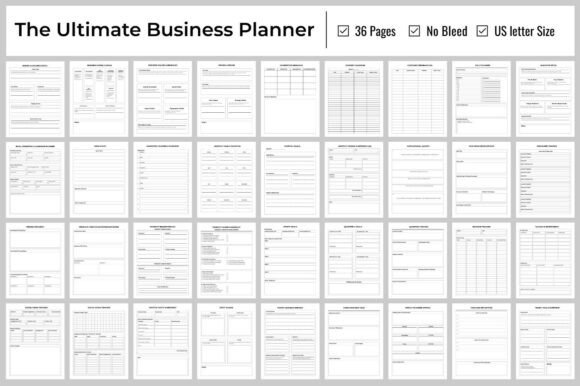
Launching a business doesn’t require perfection—it requires clarity, focus, and the right tools to translate ideas into action. The Ultimate Business Planner KDP Interior is designed for exactly that: a clean, tested, print-ready 36-page PDF interior built for Amazon KDP publishing, yet flexible enough to serve creators, solopreneurs, educators, and small teams long before their first book hits the shelf.
At its core, this isn’t just another fill-in-the-blank template. It’s a thoughtfully sequenced framework—structured in three intuitive pillars: Business Foundation, Market & Customer Analysis, and Operations Management. Every page supports decision-making, not busywork. Pages 1–10 guide you through mission definition, SWOT analysis, pricing logic, and startup readiness—not as abstract concepts, but as actionable prompts with space to write, reflect, and iterate. You’re not just documenting plans—you’re stress-testing them.
Creative Flexibility Within Structure
What makes the Ultimate Business Planner KDP Interior especially valuable for designers and content creators is its intentional balance of guidance and openness. The 36-page layout includes customizable pages—like blank strategy grids, modular checklists, and editable text boxes—that invite personalization without compromising KDP compatibility. A freelance branding designer might use the “Customer Avatar Deep Dive” (page 13) to map tone-of-voice preferences alongside visual style notes. An educator building a high school entrepreneurship course could adapt the “Startup Checklist” (page 10) into a peer-reviewed milestone tracker—with student names, due dates, and reflection prompts added directly in the PDF.
Because it’s delivered at 300 dpi, 8.5″ × 11″, no bleed, and pre-tested on KDP, you avoid common formatting pitfalls—no resizing, no margin surprises, no rejected uploads. That reliability frees up mental bandwidth for what matters most: tailoring content to your audience’s real-world needs.
Practical Applications Across Roles
For authors and publishers: This interior works seamlessly as the backbone of a companion workbook to a business book—or as a standalone low-content product. Pair it with a short lead magnet (“Download Your Free Business Launch Kit”) and convert readers into buyers. Because it’s optimized for KDP, you can publish fast, test pricing tiers ($7.99 vs. $12.99), and gather early reviews to boost visibility.
For coaches and consultants: Use the “Competitor Analysis Grids” (pages 14–15) during discovery calls—not as homework, but as a live whiteboarding tool. Print two copies: one for your client to fill out while you guide them through positioning gaps; another for your internal notes on service differentiation. The physical act of writing reinforces commitment far more than a shared Google Doc ever will.
For freelancers and solopreneurs: Skip the bloated SaaS tools. The “Advertising Campaign Tracker” (page 18) fits one Facebook ad set, one email sequence, or one local event—all on a single page. No scrolling, no tabs, no learning curve. When your time is billable by the hour, simplicity isn’t minimalism—it’s leverage.
How to Keep It Organized—Without Over-Engineering
A well-designed planner only works if it stays usable over time. Here’s how users consistently keep theirs effective:
- Start with pages 5 (Mission/Vision/Values) and 6 (Goals/Objectives)—not because they’re first in order, but because they anchor every later decision. Revisit them monthly. If your “Product Pricing Strategy” (page 9) no longer reflects your values, adjust—not the other way around.
- Use the “Legal Permits Checklist” (page 24) as a living document. Add jurisdiction-specific items (e.g., “Home Occupation Permit – City of Austin”) in the margins. Stamp “Complete” or “Pending” next to each—then snap a photo and file it in your cloud folder labeled “Compliance.”
- Treat the “Social Media Content Plan” (page 17) as a quarterly sketchpad—not a rigid calendar. Block time for ideation (e.g., “First Tuesday, 9–10 a.m.”), not just posting. Leave room to pivot when trends shift or feedback comes in.
No version control, no plugin dependencies—just consistent, human-centered organization.
Realistic Adaptations for Real Audiences
This interior isn’t locked to one industry or stage. A food truck owner repurposed the “Equipment & Supplies List” (page 22) to include vendor contact cards, maintenance logs, and seasonal menu swaps—printing fresh copies each quarter. A nonprofit founder used the “Key Team Management Structure” (page 20) to map volunteer roles instead of full-time staff, adding columns for “Availability Window” and “Skill Tags” (e.g., “Graphic Design,” “Grant Writing”).
Even educators adapting it for classroom use reported stronger outcomes when students *handwrote* responses in printed copies—especially on the “SWOT Analysis” (page 7). The physical constraint of limited space forced prioritization. One teacher noted, “They couldn’t hide behind vague statements like ‘We need better marketing.’ They had to name one channel, one budget range, one metric—and defend it.”
Why This Works Where Others Fall Short
Many business planners drown users in theory or oversimplify execution. The Ultimate Business Planner KDP Interior avoids both traps by anchoring each section in a specific, observable outcome: a completed legal structure chart, a mapped customer journey, a signed vendor agreement checklist. There’s no “inspirational quote” filler—just functional space where thinking becomes doing.
It also respects creative workflow diversity. Some users work linearly—from cover to final page. Others jump between sections, using the Table of Contents (page 2) as a navigation hub rather than a sequence. That flexibility means it scales with your process—not the other way around.
If you're building something meaningful—a side hustle, a curriculum, a client-facing toolkit, or your first published workbook—the Ultimate Business Planner KDP Interior gives you structure that serves, not stifles. It’s ready to upload, ready to adapt, and ready to help turn intention into impact—one deliberate, printable page at a time.