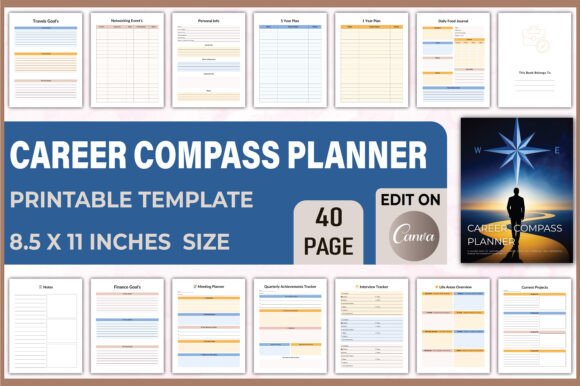
🧭 Career Compass Planner Canva
If you’ve ever opened a blank planner and felt paralyzed—not by lack of ambition, but by the sheer number of directions your life could take—then the 🧭 Career Compass Planner Canva was made for you. It’s not just another digital template. It’s a thoughtfully structured, visually cohesive design system built inside Canva that transforms abstract aspirations into tangible, trackable actions. Think of it as your personal navigation interface: clean lines, intuitive sections, and consistent spacing that guide your eye—and your decisions—without overwhelming you.
The 🧭 Career Compass Planner Canva leans into modern, accessible typography: primarily a warm, humanist sans serif for headings and body text—friendly but professional, legible at a glance yet refined enough for daily reflection. Its visual personality balances grounded practicality with quiet intentionality. Soft neutral palettes (think charcoal grays, muted sage, and creamy off-whites) keep focus on content—not decoration. Icons are minimal, functional, and consistently styled—not illustrative flourishes, but subtle signposts. This isn’t flashy design; it’s *purpose-built* design.
Where This Planner Shines—Beyond the To-Do List
This isn’t a tool for passive scrolling or occasional journaling. The 🧭 Career Compass Planner Canva thrives in real-world creative workflows—especially for designers, marketers, solopreneurs, and content creators who juggle multiple roles and shifting priorities.
- Brand strategists use its “Career Growth” and “Professional Network” sections to map client relationships alongside skill development—aligning personal growth with service offerings.
- Bloggers and publishers treat the monthly planning spread like an editorial calendar: aligning content goals with habit tracking (e.g., “write 3x/week”) and self-care check-ins to prevent burnout.
- Freelancers and small business owners rely on the dual finance + job search trackers—not just to log invoices, but to spot patterns: “When do I land my best clients? After networking events? During Q3?”
- Designers and crafters repurpose the “Life Balance” and “Leisure” pages for creative project sprints—pairing skill-building goals (“Learn Figma prototyping”) with dedicated time blocks and reflection prompts (“What part felt energizing vs. draining?”)
Its strength lies in how seamlessly it bridges planning and presence. You’re not just scheduling tasks—you’re designing your attention, your energy, and your long-term trajectory—all within one visual language.
Typography That Supports, Not Distracts
The 🧭 Career Compass Planner Canva uses type deliberately—not as ornament, but as infrastructure. Its primary font is a versatile, highly legible sans serif: open apertures, generous x-height, and subtle stroke variation. It’s optimized for both screen reading (in Canva’s editor or exported PDFs) and printed output (like bound planners or laminated weekly sheets). No display fonts compete for attention in headers—just clear hierarchy via weight, size, and spacing.
This matters because readability directly affects follow-through. A dense, low-contrast font in reflection prompts? People skip them. A cramped, overly decorative script in the habit tracker? It undermines accountability. The 🧭 Career Compass Planner Canva avoids those pitfalls. Its typography supports scanning (for quick daily review), sustained reading (during weekly reflections), and emotional resonance (through thoughtful line breaks and breathing room).
For brand-aligned adaptation, the structure invites smart font pairing. Pair its base sans with a gentle, low-contrast serif for quote boxes or milestone reflections—adding warmth without sacrificing clarity. Or layer in a restrained monospace for financial logs, reinforcing precision. But crucially: the planner doesn’t *require* font swaps. Its built-in typographic system works out of the box—no design degree needed.
Practical Tips Before You Customize
Before diving into Canva to tweak colors or swap fonts, ask yourself three things:
- What’s your primary use case? If you’ll export weekly spreads as PDFs for printing, prioritize fonts with strong hinting and robust character sets (including currency symbols and accented characters). If it’s live in Canva for team collaboration, lean into fonts already embedded in Canva’s library—no licensing surprises.
- How much customization does your workflow actually need? Many users find the default 🧭 Career Compass Planner Canva layout so well-balanced that they only adjust color accents or reorder sections—not overhaul typography. Start simple. Iterate after two weeks of real use.
- Is your font choice commercially safe? If you plan to share or sell adapted versions (e.g., a niche version for therapists or teachers), verify licensing. Most Canva Pro fonts are cleared for commercial use—but always double-check the specific typeface’s terms. When in doubt, stick with Canva’s “Free for Commercial Use” filter.
And one often-overlooked tip: test readability at 80% zoom. That’s how most people view Canva docs on laptops or tablets. If your chosen font starts to blur or tighten uncomfortably, scale back—or choose a more robust alternative.
A Tool That Grows With You
Unlike static templates that collect digital dust, the 🧭 Career Compass Planner Canva is built to evolve. Its modular sections—Goal Setting, Job Search Tracker, Finance Logs, Life Balance—are designed to be rearranged, duplicated, or hidden based on seasonality. One month you’re deep in interview prep; the next, you’re auditing quarterly finances or planning a sabbatical. The structure holds space for all of it—without demanding uniform attention.
That flexibility is rooted in intentional design choices: consistent grid alignment, reusable icon styles, and semantic section headers that function as visual anchors. It’s not “minimalist” for minimalism’s sake—it’s *edited*, with every element serving a functional or reflective purpose.
Whether you're a designer refining your portfolio pipeline, a marketer mapping campaign goals against personal development, or a student balancing internships and self-care—the 🧭 Career Compass Planner Canva meets you where you are. Not with rigid rules, but with calibrated support. Because clarity isn’t about having all the answers. It’s about building a system that helps you ask better questions—one thoughtful page at a time.