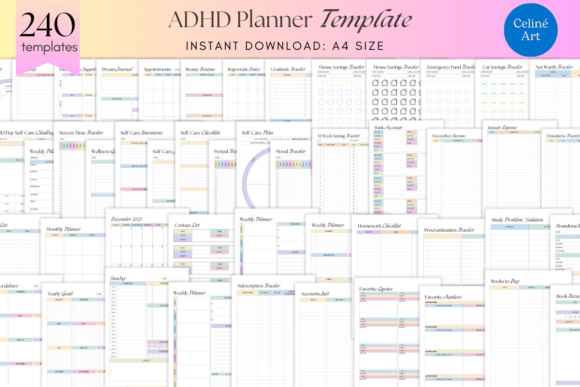
Editable ADHD Planner KDP Templates
If your current planner leaves you feeling more overwhelmed than organized—skipping pages, abandoning trackers after Day 3, or staring blankly at a weekly spread that assumes linear focus—you’re not failing at planning. You’re using tools built for neurotypical rhythms, not neurodivergent reality. That’s where Editable ADHD Planner KDP Templates shift the equation: not as another rigid system to “fix” your brain, but as a flexible, compassionate scaffold designed *with* executive function variability in mind—not against it.
Why “Editable” Isn’t Just a Feature—It’s the Foundation
This isn’t a static PDF you print once and outgrow. The Editable ADHD Planner KDP Templates are fully customizable Canva files—meaning every page, color, font, layout, and prompt is yours to adapt. Need larger checkboxes? Done. Prefer bullet points over numbered steps? Swap them. Want to merge the Mood Tracker with your Daily Planner to reduce cognitive load? Drag, drop, duplicate. That editability isn’t convenience—it’s agency. It lets you respond to shifting energy, changing priorities, or new insights without starting over. For creators selling on Amazon KDP, this flexibility also means seamless branding: swap cover fonts, add your logo, adjust spacing to meet KDP’s print specs—all without design software or developer help.
What Makes This Bundle Actually Work for Real Life
The 240-page ADHD Planner Template Bundle avoids the trap of overloading with novelty. Instead, it layers practicality with intentionality—grouping tools by function, not just theme. Consider the Ideal Day vs. Real-World Prioritizing Tool: one helps you envision alignment (energy, values, capacity), the other forces honest triage (“What *must* happen today if everything else fails?”). That pairing doesn’t assume motivation—it respects fluctuation. Or the Dopamine Tracker, which doesn’t just log “high/low” but links activities to sensory input, social context, and timing—helping users spot patterns like “I crash 90 minutes after screen-heavy tasks” or “My focus sharpens after 15 minutes of tactile movement.” These aren’t abstract concepts—they’re diagnostic levers.
Real-World Use Across Roles and Routines
Freelancers & solopreneurs: Use the Accounts Info + Subscription Tracker to audit recurring costs *before* cash flow dips. Pair the Weekly Planner with the Screen Time Tracker to spot when proposal writing gets derailed by admin overload—and protect deep-work blocks accordingly.
Educators & coaches: Adapt the Self-Care Journey Intentions page into client worksheets—customizing affirmations and reflection prompts per student’s goals. The Trigger Tracker becomes a collaborative tool during sessions, not homework.
Content creators & bloggers: Leverage the Ideal Day layout to map content batches (e.g., “Film 3 reels → edit → schedule”) alongside energy peaks. The Gratitude Log doubles as caption inspiration—real moments, not forced positivity.
Healthcare professionals & therapists: While not clinical tools, these templates support client autonomy. Recommend the Doctor Visit Log *with* space for pre-appointment questions and post-visit takeaways—reducing recall gaps and reinforcing follow-through.
Design Choices That Serve Function—Not Just Aesthetics
No decorative borders competing for attention. No dense text blocks. The typography uses high-contrast, dyslexia-friendly sans-serifs with generous line spacing. Icons are simple, consistent, and purpose-driven (e.g., a lightning bolt next to “Urgent Task,” not a generic star). Color coding is optional—and clearly labeled—so users who rely on monochrome printing or avoid chromatic triggers aren’t sidelined. Even the “Year at a Glance” spreads leave breathing room between months, avoiding visual crowding that can trigger overwhelm before you’ve written a single date.
Practical Considerations Before You Dive In
First: Start small. Don’t open all 240 pages at once. Pick *one* tracker that addresses your most persistent friction point this week—maybe the Appointments Important Days log if you’re missing deadlines, or the Sleep Tracker if fatigue is eroding focus. Master that before layering in more.
Second: Embrace imperfection. The power of editable templates lies in iteration—not perfection. If a Daily Planner layout feels clunky after three days, duplicate it, simplify the sections, and test again. Your version doesn’t need to match the preview—it needs to match *you*.
Third: Consider your output path. Planning digitally? Use Canva’s mobile app for quick edits between meetings. Printing? Stick to the undated Monthly Calendar and Weekly Planner for maximum reuse. Selling via KDP? Test bleed margins and grayscale conversion early—many users prefer printable versions that don’t demand color ink.
More Than Organization—A Framework for Self-Trust
What makes the Editable ADHD Planner KDP Templates stand out isn’t volume—it’s voice. The language avoids toxic positivity (“Just try harder!”) and prescriptive rigidity (“Do this at 7 a.m. daily”). Instead, prompts invite curiosity: “What helped me start today?” not “Why didn’t I do it?” Reflection pages ask “What did my body need yesterday?” before “What did I accomplish?” That subtle shift—from performance to presence—builds self-trust over time. When your planner stops judging and starts listening, consistency follows naturally.
For educators designing inclusive curriculum, marketers building neurodiverse audiences, or publishers expanding mental wellness offerings—the Editable ADHD Planner KDP Templates offer more than utility. They model how tools can honor complexity without sacrificing clarity. And for anyone tired of fighting their own brain to get through the day? It’s permission—to adapt, to pause, to prioritize what sustains you, not just what checks a box.